
Assalamu’alaykum wr wb..
Di postingan sebelumnya sudah dijelaskan bahwa penderita atopic seperti saya punya treatment khusus biar ga suka kambuh-kambuhan salah satunya adalah wajib menjaga kelembaban kulit dengan menggunakan pelembab keseluruh tubuh biar kulit ga kering min 2 kali sehari stelah mandi. Dan ini hukumnya wajib alias fardu ain 😀 Yang ga tau atopic silahkan baca postingan saya ini ya..
Jujur saya itu pemalas dan ga cewek banget haha.. jangankan buat pake pelembab ke seluruh badan tiap abis mandi, cuci muka aja jarang banget, paling banter ya cuci mukanya pas wudhu itupun ga pake sabun-sabunan.. Ya mungkin karna muka saya juga alhamdulillah ga jerawatan jadi ya nambah-nambah deh malesnya hehe.. *jangandiitruya..
Saya mulai agak rajin pake pelembab badan ketika negara api menyerang. Kalau atopic saya lagi kambuh, mau ga mau saya mendadak jadi rajin pake lotion + salep gatel + obat dalam. Padahal rutin menggunakan pelembab badan setiap hari untuk kulit atopic tujuannya bukan untuk mengobati tapi untuk mencegah kambuh-kambuhan *failedbgtyak *lagilagijanganditiruya
So, pelembab apa si yang dipakai untuk kulit atopic?
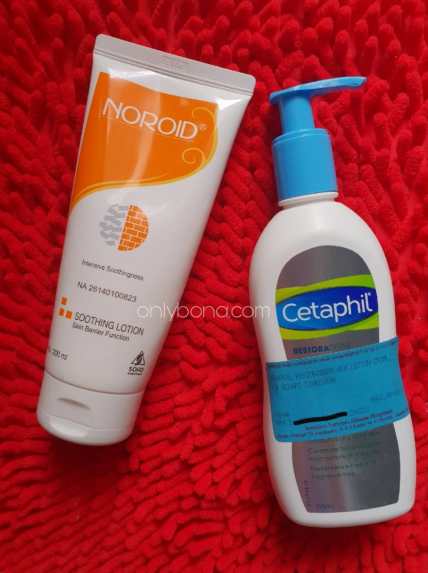
Ada dua lotion yang akan saya review, yaitu Noroid Soothing Lotion dan Cetaphil Restoraderm Lotion. Kedua lotion ini saya pakai ke seluruh tubuh atas rekomendasi dan resep dokter dari dokter Spkk (dr. Edwin Tanihaha). Jadi bukan karena saya “kreatif” coba-coba sendiri ya.. hehe..
Note :
Saya bukan orang yang suka coba-coba suatu produk makeup/skincare, karena kalo ga cocok bisa berabe malah impactnya. Berhubung produk tersebut rekomendasi dari dokter, yang in shaa Allah trusted dan pastinya mereka punya ilmu yang mumpuni dibidangnya, ya udalah jadi saya manut aja pakai lotion tersebut. Continue reading “REVIEW : Noroid Soothing Lotion Dan Cetaphil Restoraderm Lotion, Lotion Untuk Si Kulit Atopik”



 tol bali diambil dari pesawat
 onlybona.wordpress.com